|
|
|||||||||||||||||||

|


|
 |
 |
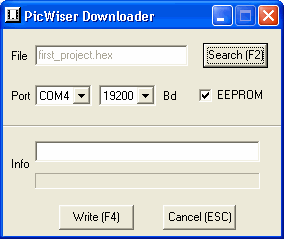
PicWiser contains a bootloader that allows it to be programmed, or reflashed, from the PC. This small-embedded program executes only after a reset (caused by either a power-up or pressing the reset button) and looks for a command to be sent to it over the USB connection from the PC. If there are no commands after a short period of time, execution is transferred to your application. At reset, the micro loads the program counter with the address contained in the reset vector. This address usually contains the address of the first location to execute in your application. Instead, the address of the bootloader is placed in the reset vector (this is already provided) causing the bootloader to be executed at reset. The bootloader is a very small program that is placed in the upper portion of memory so that your application can use the remaining bulk of the program memory. The bootloader executes for a very short period of time watching the serial channel for commands and if it does see any then it will jump to the real start of the application program. In order for you to quickly develop programs and download them to the board, a PC downloader program is needed. This program reads the file containing your program and sends it over the COM port to PicWiser and it knows how to program itself. When the programming is complete, PicWiser immediately executes your program. The Picwiser Downloader program for the PC is available in the zipped file at www.picwiser.com/PicWiserDownloader.zip. Unzip the files to a directory such as c:\PicWiser and execute the PicWiserDownloader.exe file.
|
 |
|
||||||||||||||||||||||||||||||||||||||||||||||||||
 |
|
|
|
|



|